Write Your First Visual Basic Program
The
Command Button's KeyPress, KeyDown and KeyUp Events
The events that will be mentioned in the
following pages
are commonly used, and without learning about them
you
really can't go anywhere in Visual Basic programming.
To try these examples, start a new project (as
being
taught in Lesson 1).
Add 1 Command Button to your form. The Command
Button
is called by default Command1.
Copy the
following code to the code window (you
can copy and paste it using Ctrl + C
for copying
and Ctrl + V for
pasting):
Private Sub Command1_KeyDown(KeyCode As Integer, Shift As
Integer)
Print "KeyDown"
End Sub
Private Sub Command1_KeyPress(KeyAscii As Integer)
Print "KeyPress"
End Sub
Private Sub Command1_KeyUp(KeyCode As Integer, Shift As
Integer)
Print "KeyUp"
End Sub
When the Command Button's KeyDown event will be
executed,
"KeyDown" will be printed on the form,
When
the Command Button's KeyPress event will be executed,
"KeyPress" will be
printed on the form, and when
the Command Button's KeyUp event will be
executed,
"KeyUp" will be printed on the form.
Run the program,
and click the button with the mouse.
Nothing has happened.
It's because
the KeyDown, Key_Press, and KeyUp events are
being executed Only when you
press a key on the keyboard.
Now press any key
on the keyboard, hold it down for few seconds,
and then release it.
Your
form will look like this:
Figure 1
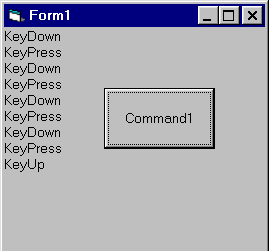
Lets see:
The first event that been executed is the
KeyDown event,
because "KeyDown" was the first text that been printed on
the form.
The second event was KeyPress, and then again
KeyDown.
After every KeyDown event that been executed, a KeyPress
event
had been executed.
We learnt that when a key is being holded down,
the
KeyDown and the KeyPress events are being executed in
this order over and
over again, until the
key is up
again.
When you release the key, the KeyUp event is being executed
once.